Generate PDF Report in Dynamics CRM 365 

Learn how to generate PDFs from Dynamics 365 reports programmatically with JavaScript, including handling custom and OOB SSRS reports.

Share :

Generate PDF Report in Dynamics CRM 365

Author

Picture of Bhavika Patel

Bhavika Patel

There is plenty of material available to achieve this very commonly needed functionality to generate PDF of the existing report in your CRM system. I will give some tips and tricks to achieve this in most efficient way. 

The requirement is to download PDF format of the SSRS report (OOB or Custom) on a button click either on home page grid or on a button click on the form. 

This can be divided in steps: 

Step 1: Get ReportSession and ControlID 

Step 2: Download report as PDF 

Tips and Tricks 

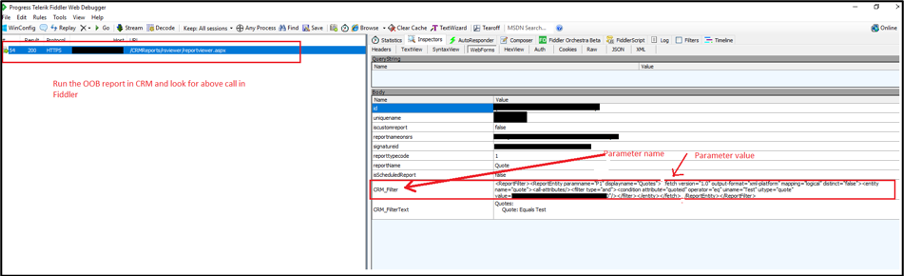
It is very important that you prepare parameter XML and query string correct in order to generate PDF report smoothly. I will show you how you can smoothen this.  

  • If custom report is generated with report Wizard i.e. enableprefiltering=”1″, then use below example for query string where CRM_Filterednemely_quote is parameter name in the custom report on Quote entity. 
  • If custom report is created without prefiltering, then use below query string where CRM_Filterednemely_quote is parameter name in the custom report on Quote entity. 
  • If custom report and not using fetch as parameter. 
  • To get parameter XML, use fiddler to get all details you need. 

Hope this helps to achieve your goal. Please contact us if you have any questions.  

Related Posts

Do You Want to Grow Sales – Without Growing the Organization? 

It is a long established fact that a reader will be distracted by the readable content of a page when looking at its layout.

Read More

Connect to Multi-factor enabled D365 Dataverse

Connect to Multi-factor Enabled D365 Dataverse/CDS Programmatically Using Certificates (Online 9.1) 

Connect programmatically using Certificates (Online 9.1) The more secure way to achieve S2S authentication.

Read More

Refresh CRM Grid using JavaScript

Refresh CRM Grid using JavaScript 

Learn how to refresh Dynamics 365 forms and views programmatically using JavaScript.

Read More

Connect to D365 CE Programmatically

Connect to D365 CE Programmatically without MFA/ On-Premise D365 CE

Learn how to create C# connection strings for Dynamics 365 on-premise and CDS online.

Read More

Contact Us

Leave your contact details here and we’ll get in touch

Get resource