


As per Microsoft announcement, use of the WS-Trust authentication security protocol when connecting to Common Data Service is no longer recommended and has been deprecated; see the announcement here.
Note: This change only impacts client applications that connect to the Common Data Service. It does not impact custom plug-ins, workflow activities, or on-premises/IFD service connections.
Also, nowadays more and more organizations are focusing towards security and hence they have enabled Multi-factor Authentication.
In all, there is a need to connect to D365 CDS using a more robust and latest way. We will use capabilities of Azure Active Directory here.
Step 1 : Get Application ID and Client Secret Key using Azure Active Directory
- Connect to Azure Admin Portal
Login to https://portal.azure.com
Click on Azure Admin Directory
Click on App Registrations
Click on New registration - Give an appropriate name of your app which is going to connect to D365 CDS programmatically. Click Register.
Copy generated Application ID
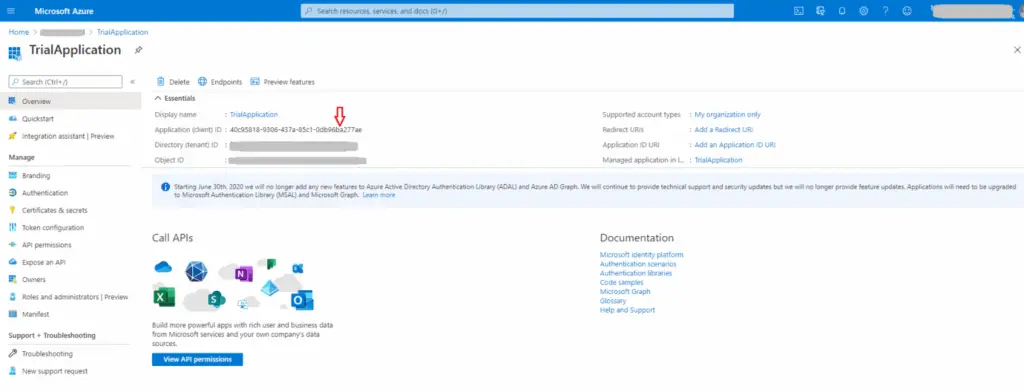
Now click on Certificates and Secrets for your app.
Click on ‘New Client Secret’, add description and expiry details.
Once added, copy ‘Client Secret Key Value’.
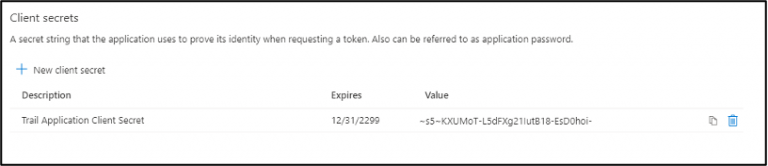
Step 2 : Add Application User in D365 CDS Environment
- Login to D365 CDS environment.
- Go to Settings –> Security –>Users.
- Change the view to ‘Application Users’ and click New. Make sure the form is ‘Application User’ form.
- Add details and Application Id generated in step 1 above.
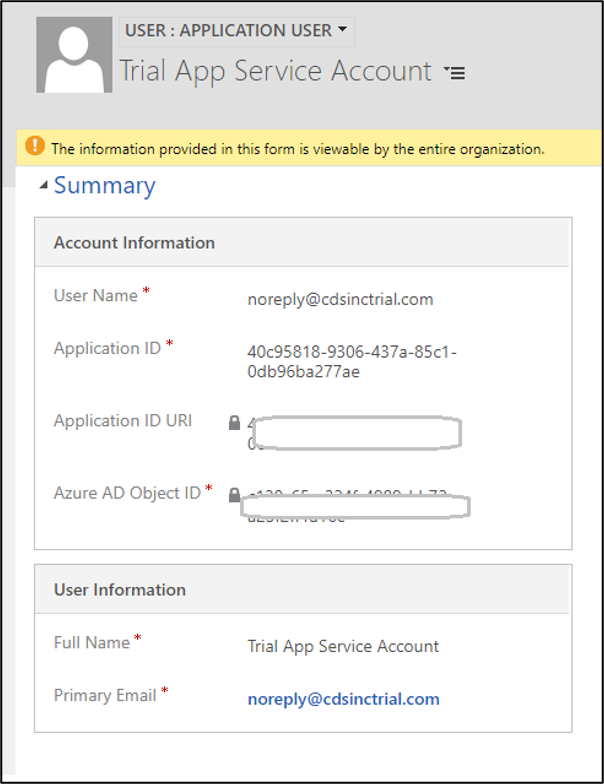
- Assign appropriate Security role to this Application User as per your organization’s security set up.
Step 3: Add connection string in your c# code as follows:
Format
String connectionString = “AuthType=ClientSecret; url=<your organization URL>; ClientId=<your application id>; ClientSecret=<client secret key>”;
Example
string connectionString = “AuthType=ClientSecret; url=https://cdsinctrial.crm.dynamics.com/main.aspx; ClientId=40c95818-9306-437a-85c1-0db96ba277ae; ClientSecret=~s5~KXUMoT-L5dFXg21IutB18-EsD0hoi-“;
Code Snippet: (Change values as per your organization set up values)